
AI BOOST FOR YOUR ANCESTRY RESEARCH
 My great-grandfather was a Cherokee, according to my mom. So I’m one-eighth, I figured. But Ancestry.com and 23andMe say I have no Native American ancestry. Who’s right?
To find out, I used MyHeritage’s new GAIA service, powered by artificial intelligence. First I asked it to research my great-great-great-grandmother Jincey Bales, on my mom’s side. GAIA found several family trees that listed her parents’ and siblings’ birthplaces as Red Clay, Tennessee, the last capital of the Cherokee Nation in the eastern United States. One tree lists her as “Tsinvsi,” a name that appears to be Cherokee. Her dad, John W. Craig, is labeled “Cherokee” in another family tree. Yet another tree labels a Craig of the next generation as “Cherokee.” Another ancestor’s middle name was “Bearpaw.”
None of this proves I have Cherokee ancestors. Family trees can be wrong. But if they’re right, my Cherokee ancestry is closer to one-thirty-second than one-eighth.
This all started when I received an email addressed to MyHeritage subscribers inviting us to test GAIA through a limited number of free conversations. The company plans to offer extended access through a new subscription called OmniAI. More info at MyHeritage.com.
Throw-Away Culture
“My first smartphone had a battery I could replace for $15. Now everything is throwaway,” said a reader. “But you can still get phones with swappable batteries,” I countered.
The Samsung Galaxy XCover 7, $275 on Amazon or Walmart, allows you to replace its battery without a screwdriver or adhesive. It’s a ruggedized phone designed for tough environments but might be useful anywhere.
The Fairphone US Generation 6 Plus, $650 at US.Fairphone.com, makes it easy to replace 12 different parts yourself, including the battery, the screen, the cameras and more, with just a small screwdriver. It comes with 12 gigabytes of RAM and 256 gigabytes of storage, expandable to two terabytes. The battery lasts up to two days between charges. It also has a 6.3-inch OLED display.
The HMD Skyline 5G Dual Sim Smartphone, sold by Target for $400, lets you replace the battery by opening the phone and removing the adhesive. But it isn’t a quick swap.
 Novel Electric Toothbrush
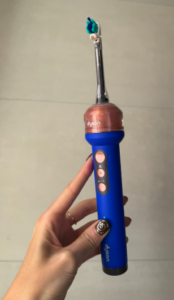
My teeth have never felt cleaner, thanks to a new kind of electric toothbrush called the Ranvoo AirJet X5. To me, it’s like a dental hygienist who makes house calls.
Ranvoo claims its combination of vibrating bristles and air-and-water microbubbles removes up to 99.97% of plaque. I haven’t seen independent clinical evidence for that, but the cleaning sensation is great. A dental hygienist on YouTube compared it to the ultrasonic scaler used at dental offices. It’s very gentle.
On the other hand, my dentist swears by Oral-B products, which are pricier. Their top-of-the-line model, the iO9, is $380 and the iO5 costs $150. The Ranvoo AirJet X5 was $127.50 on Amazon and on the company website when last I checked. Most of the Amazon reviews are favorable but some reported failures after six months or so. I have nothing to lose since Ranvoo sent me the toothbrush for free. I’ll report back later.
 Bee Warned
“Alexa, remind me about carnivores and clean oceans at 8 a.m.,” I said just as I was falling asleep. The next morning, I had no idea what I meant.
Wouldn’t it be great if I could speak into my wrist and have it recorded? That’s the promise of the new $75 “Bee Frontier” from Amazon, which also includes an AI companion.
Unfortunately, I had a horrible out-of-box experience. First, it wouldn’t pair with my phone. Then, it went overboard. For example, during yoga, it recorded the lyrics of all the songs I’d been listening to in downward dog.
I could have stopped the recording by pressing the Bee button. I could also have changed the app’s settings to automatically pause a recording after five minutes or more of silence. But even with that, I can’t get beyond the “ick” factor. Bee makes me feel self-conscious, even though Amazon says it encrypts the data it saves and doesn’t retain the original audio. So I asked for and received a refund.
Amazon also announced a “Bee Eclipse” for $100. It looks like a slim battery charger that attaches to your phone. You still have to press a button to stop a recording, and if you don’t want certain transcripts or summaries retained, you have to delete them yourself. However, without the $12-a-month Bee Pro, its AI can search only the last 14 days of conversations.
But to me, all this stuff creates too much busywork, making me feel like I have to babysit my own wearable. I don’t need an AI analysis. I just want the recordings.
For iPhone users, there’s the free Apple’s Voice Memos, which also works on an Apple Watch. Samsung Galaxy phones have Voice Recorder, while Google Pixel phones offer Google’s Recorder app. I tried Voice Memos on my Apple Watch by pressing the crown and tapping the icon. Works great.
Internut
Cato.org just released the 2026 edition of “Freedom in the 50 States,” which ranks states on economic and personal freedom. Its interactive maps let you compare states on everything from taxes and housing to education and privacy. Arizona scored highest in overall freedom. Illinois was 39th. It was 31st in fiscal burden, 43rd in occupational freedom, and 47th in firearm freedom among many other categories.
Filed under: AI, batteries, gadgets, Internuts, phones, wearables | Add New Comment »
 Remembering Stuff
  New Alexa Tablet
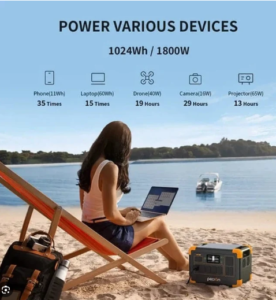 Could a giant rechargeable battery keep your appliances going during the next blackout? A reader named Sheila asked me to find out.
 Shoe Tech
 Robot News
 My late husband Bob tried to get hyperbaric oxygen therapy for his diabetic foot ulcers, but he couldn’t get an appointment. The only center near us reserved its chambers for emergencies such as carbon-monoxide poisoning, decompression sickness, gas embolism, severe crush injuries and certain kinds of infections.
  When an old high school friend reached out to me through
 Internut
 AI finds witnesses
 Fitness Fiasco
 Obsessed with Health Wearables
 Robot News